
Sections 8–11
Reference
8. Reading the report
After a Mesh → Solid or Sliced Loft run, the rail scrolls to the report.
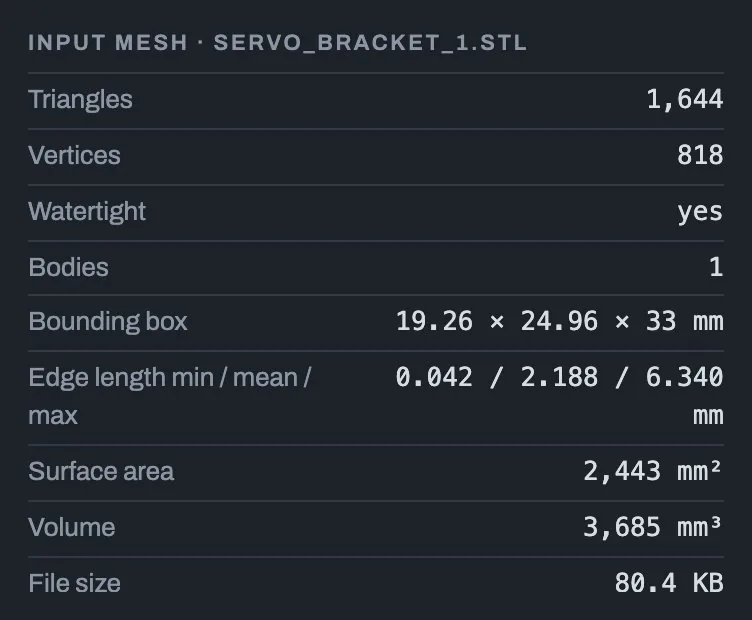
Input mesh. The file as read: triangles, vertices, watertight or not, bodies, bounding box, edge lengths, surface area, volume and file size.
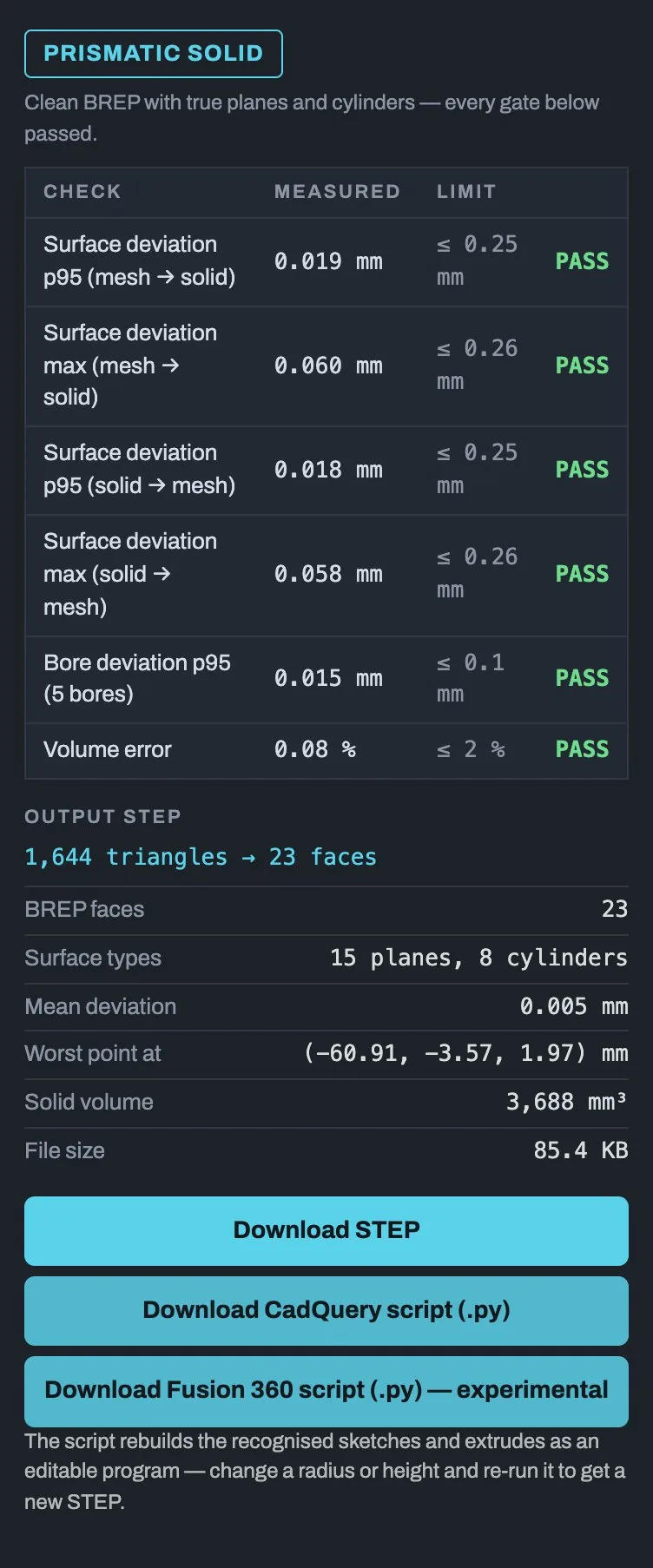
Result badge. Which route made the solid:
| Badge | Meaning |
|---|---|
| Prismatic solid | A clean extrusion with true planes and cylinders. Every check passed. Scripts are offered. |
| Face-group solid | Surface regions fitted with real planes, cylinders, cones, spheres and tori. |
| Sliced loft solid | The sliced loft. Checks are shown for information. |
| Faceted solid | No clean fit passed. The solid is exact and closed, but made of facets. |
Bodies table (multi-body files). One row per body: its triangle count, which route it took and details.
Checks table. Each check with the measured value, the limit and PASS or FAIL. Deviation is measured both ways: from the mesh to the solid and from the solid to the mesh.
Output STEP. The headline shows the reduction, for example
1,644 triangles → 23 faces. Below it: face count, surface types, mean
deviation, where the worst point is, the solid's volume and the file size.
Surfaces, not solids. If the bodies you picked were not closed, the STEP holds surfaces instead of a solid. You can measure them and snap to them, but you cannot cut or join them.
9. Using the results in Fusion 360
Importing a STEP
In Fusion 360 choose File → Open → Open from my computer, or drag the
.step file into the Data Panel. The part arrives as a solid body with
real faces you can sketch on, measure and constrain.
Running a downloaded script
All the Fusion scripts (Mesh → Solid, Sliced Loft, X-Ray and Blueprint) run the same way:
- Put the
.pyfile in an empty folder of its own. - In Fusion 360: Utilities → Add-Ins → Scripts and Add-Ins.
- Click +, choose that folder, then click Run.
For Blueprint, run it in a new parametric design. Longer scripts show a progress dialog with a Cancel button. For more detail, open View → Show Text Commands.
10. Troubleshooting
| Problem | What to do |
|---|---|
| The part is 10× (or 25.4×) too big or small | Change The file's numbers are in, or use …then multiplied by (for example 0.1). Watch Longest side as converted. |
| I got a Faceted solid instead of a clean one | Open the checks table to see which limit failed. Try a slightly larger Fit tolerance or Surface deviation (max). For smooth organic shapes, try Sliced Loft. |
| Conversion runs out of memory (oom) | Tick fewer bodies. Each body converted at the same time can use several gigabytes. |
| Conversion crashed | The geometry kernel gave up on one face. Pick fewer bodies, raise the tolerance, or try Sliced Loft. |
| The result is surfaces, not a solid | The picked bodies are not closed (marked open). Pick closed bodies, or repair the mesh first. |
| A slice outline is broken into pieces | The mesh is leaky. Raise Join gaps up to. |
| Thin slivers or hairpins in the outline | Raise Trim slivers up to a little, but keep it below the part's thinnest real feature. |
| A thin rib or tab vanished from a slice | Trim slivers up to is too high. Lower it, or set it to 0 on a watertight mesh. |
| X-Ray says too many slices or over the time limit | Raise the spacing, narrow the start and end planes, or tick Outline only. |
| Sliced Loft turns a sideways hole into a trough | That is a limit of slicing. Use Mesh → Solid for machined parts. |
| Blueprint says a key is needed | Paste an API key for the chosen provider, or pick a local Custom server. |
| Blueprint misread a number | Fix it in the Parameters table and click Rebuild. No new read is needed. |
| Mesh to Outline left a groove in the extruded solid | Some slices did not close. Raise Join gaps up to to the value the warning gives. |
| A red banner appears at the top | Read the message. Open details for more, then dismiss it with ×. Your file and settings stay loaded. |
11. Quick reference
File types
| Kind | Extensions | Opens in |
|---|---|---|
| Mesh | .stl .obj .ply .off .3mf .glb .gltf |
Mesh → Solid, Sliced Loft, X-Ray |
| Drawing | .jpg .png .webp (or paste from the clipboard) |
Blueprint |
Default settings
| Setting | Default |
|---|---|
| Units / multiplier | mm / 1 |
| Fit tolerance | 0.08 mm |
| Surface deviation p95 / max | 0.25 mm / 0.26 mm |
| Bore deviation (max) | 0.10 mm |
| Volume error | 2 % |
| Faceted reduce tolerance | 0.05 mm |
| Slice spacing (Sliced Loft, X-Ray, Mesh to Outline) | 0.2 mm |
| Join gaps up to | 2.5 mm |
| Trim slivers up to | 0 mm |
| X-Ray limits | 500 slices, about 4 minutes of fitting per download |
| Mesh to Outline stack | 10 sections (2 to 400) |
| Blueprint effort | high |
What each tool gives you
| Tool | STEP | Fusion 360 | Other |
|---|---|---|---|
| Mesh → Solid | Yes | Script: parametric timeline (prismatic) or Boundary Fill (face-group) | CadQuery script (prismatic) |
| Sliced Loft | Yes | Script: section sketches + Loft per run | — |
| X-Ray | — | Script: one sketch per slice, optionally extruded into slabs | — |
| Blueprint | Yes | Script: User Parameters, sketches, extrudes | 3D preview |
| Mesh to Outline (add-in) | — | Sketches drawn straight into the design, optionally extruded into one body | — |
stlToSolid 0.5.7 · Licensed under PolyForm Noncommercial 1.0.0 · Fusion 360 is a trademark of Autodesk, Inc. stlToSolid is not affiliated with Autodesk.